
GDD 1
Overview
About
Game Design and Development 1 is an introductory course about Game Design, Game Mechanics, Game Art, Game Engines, Gamer Psychology, and more.
The course consists of interactive presentations, guest lectures, individual assignments, and a group assignment where you design and implement your own game.
Attendance is not mandatory except for the course introduction lecture, the tutoring interviews, and the final presentation.
As part of creating your group game, you’ll also need to submit it to our itch.io jam. You’re not required to make your game publicly available there, but you must provide access to our tutoring team.
You may also take a look at our game collection, featuring our previously hosted game jams.
Schedule
This table shows when lectures are held and when submissions are due. This semester’s schedule is subject to change, meaning some dates and locations might be updated based on current circumstances. If changes happen, we will make a separate announcement in our Discord server.
Some units will be held online using Webex, as indicated in the table below. Meeting links for these sessions will be shared via the Discord server and/or the TeachCenter.
Green-highlighted dates are mandatory!
| Date | Event |
|---|---|
| 02-10-2026, Fri | [online] Course Introduction, 101 Games |
| 06-10-2026, Tue | [I-00] Send Discord Names (Submission) |
| 09-10-2026, Fri | [HS i11] Game Design Basics |
| 11-10-2026, Sun | [I-01] GameDevDojo (Submission) |
| 16-10-2026, Fri | [online] Game Engine Overview & Unity I |
| 23-10-2026, Fri | [online] Unity II and I-02 Framework |
| 25-10-2026, Sun | [G-00] Group Registration (Submission) |
| 25-10-2026, Sun | [G-01] Group Kickoff (Submission) |
| 30-10-2026, Fri | [online] Playtesting |
| 06-11-2026, Fri | [HS i11] GIT Workflow & Project Management |
| 06-11-2026, Fri | [itch.io] Jam opening |
| 08-11-2026, Sun | [G-02] Game Design Document Draft (Submission) |
| 13-11-2026, Fri | [HS i11] Gamer Psychology |
| 20-11-2026, Fri | [online] Game Art Overview |
| 22-11-2026, Sun | [I-02] Pokémon Game (Submission) |
| TBA | [Tutoring Interview] Individual Assignments |
| 27-11-2026, Fri | [HS i11] Game Design Selected Topics I |
| 04-12-2026, Fri | [HS i11] Game Design Selected Topics II |
| 06-12-2026, Sun | [G-03] First Prototype (Submission) |
| 11-12-2026, Fri | [HS i11] Game Design Selected Topics III |
| 13-12-2026, Sun | [Second-Chance Assignment] 2D Side Scroller Shoot’em up |
| TBA | [Tutoring Interview] Development Progress |
| 18-12-2026, Fri | [HS i11] Game Design Selected Topics IV |
| 20-12-2026, Sun | [G-04] QA Feedback (Submission) |
| 08-01-2027, Fri | [HS i11] Game Design Selected Topics V |
| 15-01-2027, Fri | [HS i11] Game Design Selected Topics VII |
| 22-01-2027, Fri | [HS i11] Game Design Selected Topics VII |
| 29-01-2027, Fri | [HS i11] Game Design Selected Topics VIII |
| 31-01-2027, Sun | [G-05] Full Game (Optional Submission) |
| 28-02-2027, Sun | [G-05] Full Game (Submission) |
| March 2027 | [itch.io] Jam closing |
| March 2027 | Final Presentation |
Before you start…
Credits
You must list credits in your game! Even if you made all (or some) assets yourself, put yourself on the list. We should be able to locate all the assets you used online through the credits you provide.
Do not just reference a website’s homepage or general index. Link to the specific page where the asset can be found.
Bad example: https://pokemondb.net/
Good example: https://pokemondb.net/sprites/charmander
The game must include a separate screen that displays all credits. The credits must not be visible during actual gameplay! This applies to every assignment (Pokémon, Group project, Second Chance Assignment).
Unity version
For this course, all individual projects (including Second Chance Assignment) must be developed using Unity version 6000.3.23f1. Failure to comply with this requirement may result in a deduction of points.
Git usage
Game Design and Development is a Master’s course within the field of computer science, so we expect everyone to be proficient with Git. Please be aware that points will be deducted if the following criteria are not met:
- Meaningful commits: The repo should show multiple commits that reflect the progress along the way. A minimum of five commits is expected.
- Invalid project: We expect the repo to be a functional Unity project at all times.
- Maintainer assignment: Set an appropriate duration for the role of maintainers. For the entire course, we (the tutors) need to be able to access your repository.
Extended Deadline
For all assignments, except I-00 and G-00, an extended deadline is available. If the original deadline falls on a Sunday, the extended deadline can be used to extend the deadline until the end of Tuesday, granting an additional two days.
However, this comes at a 30% point reduction of all otherwise earned points for the assignment.
You do not need to inform the tutoring team that you are using the extended deadline. TeachCenter will automatically detect late submissions and inform the tutoring team.
You cannot submit tasks beyond the optional extended deadline.
Contact
If you have any questions, please check this semester’s Discord channel first. If you can’t find an answer there, feel free to ask your question directly in the channel.
For private questions, you can contact one of the tutors, Florian Wohlmuth or Ivan Jurinić, directly via Discord or email. However, we highly encourage you to ask questions in the server’s channel first, as others may have the same question.
Individual Assignments (40%)
[I-00] Say Hello (mandatory)
Say hello on Discord! Join our GameLabGraz Studies Discord server and let us know who you are on Discord by telling us your username in TeachCenter. Then we can assign you the appropriate role for the current semester. Please use your first or full name as a nickname for the Discord server.
Discord will be our primary announcement source, as well as a forum for asking and answering questions.
For security reasons, the link to our Discord server can only be found in the TeachCenter course.
[I-01] Game Dev Dojo (5%)
Task Description

Play the educational game GameDevDojo. The game is designed to guide users through key principles of game development by interacting with predefined game objects, adding components, and adjusting settings to solve challenges. This process offers a hands-on experience with real-time feedback to enhance your understanding of game development mechanics.
The GameDevDojo application can be found and downloaded here.
Instructions:
- Start the Game
- Launch GameDevDojo and enter your matriculation number to begin.
- You must complete the lower levels to unlock the higher ones progressively.
- Level Progression
- For each level, manipulate the predefined game objects by adding components or adjusting settings according to the level objectives.
- Upon completing a level, you will receive an individual code that you must submit as proof of completion.
- Game Components and Interactions
- The game provides a separate view for selecting new components to add to game objects.
- Access component descriptions by clicking the help icon (?) next to each option.
- To add a component:
- Click on a game object to open its settings in the component view.
- Select a component from the dropdown and press the “add” button to attach it to the object.
- Modify settings by selecting/unselecting or enabling/disabling components in the component list.
- Feedback and Subtasks
- If you configure a component correctly, the game will provide visual feedback (a confetti effect near the help button) to indicate that you’ve completed part of the task.
- Help and Guidance
- Click on the “help” button in the lower-left corner to open a help view that provides additional guidance.
- The help view displays the accomplishment status of each game object and its required components:
- A green indicator shows a fully configured object.
- A red indicator means components are missing or misconfigured.
- Use the help feature to check for missing components, incorrect configurations, or to get more information about specific components.
- Level Completion
- Ensure that all necessary components are added and configured accurately to complete the level and receive your unique completion code.
Submission
In TeachCenter, submit the code you received upon completing the highest level you solved (e.g., Level 5). This is required to receive the assignment points. Make sure you used your correct matriculation number in Step 1; otherwise, no points can be awarded.
[I-02] Pokémon Game (35%)
Task Description

For this task, you have to create a Pokémon-like game in Unity. Using the framework available in TeachCenter, you must extend the project by implementing the features listed below. This will give you a better understanding of working with an already existing project and how to expand it.
As a side note, to progress the dialogue or confirm a selection, press ‘C’, to cancel an action or return to the previous screen, press ‘X’. You can find the framework on the TeachCenter.
Create a private repository on gitlab.tugraz.at and add both tutors as maintainers: Florian Wohlmuth (@9929BEA20AF297DB) and Ivan Jurinić (@2CB5598FFD28F44A). Consider the criteria that were mentioned before (especially in terms of listing credits). The repository must follow the given naming convention gdd2-2026_27-i02-########, where ######## represents your matriculation number. For example gdd2-2026_27-i02-12345678.
Additional considerations
- No visible “void”: Everything visible in the game world must be covered with appropriate sprites or other suitable visual assets. Empty, blue, or void background areas are not acceptable.
- Game stability: The game must not crash or enter a state in which the player can no longer make meaningful progress or continue playing. All implemented functionalities must be properly tested and debugged. Known bugs or issues that prevent the implemented features from functioning as intended should be fixed before submission.
- Task requirements: Make sure to carefully read and follow all requirements specified in the individual tasks. If something is not explicitly specified in the task description, use common sense and implement the functionality in a way that is consistent with the intended behavior of the game and the described requirements.
- Unity version: The provided Unity version must not be changed.
- Assembly definition files: The provided assembly definition files are part of the framework and are required to organize the scripts. They must not be deleted, modified, or bypassed. The use of assembly definition files is mandatory.
Game Implementation (30%)
The following three features must be implemented. Each task is represented with detailed instructions and clearly defined requirements. Not following these requirements will result in point deduction. Tasks 1 and 2 are mandatory. For task 3, you must choose either 3.1 (Cut) or 3.2 (Surf). You do not need to implement both. Each task is worth 10%, for a total of 30%.
In total, the final submission must contain all three features: Gym and badge, Mini-Map, and either Cut or Surf.
Bonus points
Each task also offers bonus-point opportunities. A maximum of 5% bonus points can be awarded across all three tasks combined. Additional bonus points beyond the 5% maximum cannot be awarded. As mentioned above, bonus points are not affected by the reduction applied when using an extended deadline.
1. Gym and badge (10%)
To make your game more challenging and to introduce a progression goal, implement one Pokémon Gym. Like in the original Pokémon games, the player must be able to challenge a Gym Leader, defeat them in battle, and receive a Gym badge as a reward. The Gym must be implemented as an indoor area.
The following requirements must be fulfilled:
- Gym area: The Gym must be implemented as a dedicated indoor area that is clearly distinguishable from the surrounding outdoor areas.
- Gym Leader: The Gym must contain one Gym Leader who can be challenged by the player.
- Badge acquisition: The player must receive a Gym badge only after successfully winning the battle against the Gym Leader. Losing the battle must not award the badge.
- One-time defeat: Once the Gym Leader has been successfully defeated, the Gym Leader must not be challengeable again. The same Gym Leader must only be defeatable once.
- Badge showcase: The game must provide a way to view the player’s obtained badge. The badge showcase must be accessible at any time outside of combat, regardless of the player’s current location.
- Persistent badge: Once obtained, the badge must remain available in the badge showcase and must not disappear when the player leaves the Gym or changes areas.
There is no requirement to include a puzzle, labyrinth, or additional trainers before the Gym Leader battle. However, adding a substantial challenge before the Gym Leader battle can earn bonus points. Make sure to indicate in your report where the tutoring team can find the gym on the map.
1.1 Bonus (+2.5%)
To earn the bonus, implement a substantial gameplay challenge that the player must complete before reaching the Gym Leader. The challenge should meaningfully extend the player’s interaction with and exploration of the Gym.
Examples include a puzzle requiring multiple steps, a maze or navigation challenge, or another comparable gameplay challenge that requires active player interaction.
The challenge must consist of more than simply adding additional trainers, NPCs, or other passive obstacles. It should introduce a distinct gameplay element that requires the player to actively solve, navigate, or interact with the Gym environment.
2. Mini-Map (10%)
The bigger the game world becomes, the more confusing orientation can become. To help the player navigate the world, implement a Mini-Map showing the player’s current position and the surrounding environment from a top-down perspective.
The following requirements must be fulfilled:
- Player position: The player’s current position must be indicated on the Mini-Map using a clearly visible and simplified player marker. The actual player sprite must not be used as the marker. The marker should be a simple, easily recognizable shape or sprite that clearly indicates the player’s location.
- Player centered: The player’s marker must remain in the center of the Mini-Map while the player is moving.
- Moving map: The map itself must move according to the player’s position, so that the area surrounding the player changes as the player moves while the player remains centered.
- Map boundaries: The Mini-Map must never display areas outside of the playable game world. When the player approaches the edge of the map, the Mini-Map must adjust accordingly rather than showing empty space or areas beyond the playable environment. For example, the Mini-Map must not move beyond the visible boundaries of the game world.
- Top-down view: The Mini-Map must display the game world from a top-down perspective.
- Route and area names: The Mini-Map must display the names of relevant routes and different areas. These names must be visible on the Mini-Map only.
- Static UI position: The Mini-Map must remain in a fixed position in a corner of the game screen while it is active. It must not move together with the game world or player.
- Visibility: The Mini-Map must be shown during normal gameplay in outdoor areas; thus, it must not be shown during Pokémon battles or while the player is inside an indoor area.
- Appropriate zoom and navigation: The Mini-Map must show a meaningful portion of the player’s surroundings at an appropriate zoom level to provide useful orientation. It must not display the entire game world at once, but it must also not be zoomed in so closely that the player occupies most of the Mini-Map or that only a few tiles immediately surrounding the player are visible. The Mini-Map should provide a sufficiently wide view of the surrounding environment to allow the player to recognize nearby paths, areas, and landmarks while still providing enough detail to be useful for navigation.
2.1 Bonus
Further enhance the Mini-Map with additional navigational information. Bonus points can be earned for implementing the following:
- Player direction (+0.75%): The player indicator rotates according to the direction in which the player is facing, allowing the player to immediately recognize their current orientation. A directional, cone-shaped indicator with a pointed front is recommended.
- Zoom control (+0.75%): The player must be able to switch between multiple predefined zoom levels of the Mini-Map. The zoom levels must be fixed and clearly distinguishable, and the player must be able to toggle between them during gameplay. As mentioned above, make sure to handle map boundaries correctly!
3. New field move (10%)
Implement one new Pokémon field move. You may choose either Cut or Surf. You do not need to implement both.
The selected move must be usable both inside and outside of combat. When used outside of combat as a field move, it must include a dedicated animation sequence in which the Pokémon visibly performs the move. The implementation should be inspired by the corresponding field-move behavior in the original Pokémon games.
3.1 Cut (move)
Implement the field move Cut, allowing the player to remove designated cuttable plants or trees from the environment.
The following requirements must be fulfilled:
- Cuttable obstacle: Implement at least one clearly identifiable plant or tree that must be placed in the game world and can be removed using Cut.
- Interaction: The player must walk up to the cuttable plant/tree and interact with it.
- Availability check: The game must check whether the player’s party contains a Pokémon capable of using Cut. If no suitable Pokémon is available, the player must not be able to perform the move. If a Pokémon can perform Cut, the player must be given the choice to use it now or not. Do not just use it without asking the player first.
- Player lock: During the cut sequence, the player must not be able to move or give any other form of gameplay input.
- Field-move presentation: After the player confirms the move, a dedicated horizontal field-move presentation area/overlay must appear on the screen, within which the Pokémon performing the move must enter or appear. For more details, see below.
- Cut animation: A recognizable Cut animation must be played on the cuttable plant or tree.
- Obstacle removal: After being cut, the targeted plant/tree must disappear from the game world so that it no longer blocks the player’s path.
The field-move presentation should follow the general presentation of field moves in the original Pokémon games: after confirmation, a horizontal presentation area is displayed, followed by the Pokémon entering or appearing within the area and performing the move animation. For a visual reference, see here, especially the implementations in RSE and FRLG.
The presentation area itself does not need to be animated. A simple black horizontal area is sufficient. The Pokémon may simply enter or appear within the area, remain visible for approximately one second, and then disappear again, as shown in the visual reference. More elaborate animations of the presentation area itself are considered part of the bonus.
3.1.1 Bonus
Enhance the Cut field-move presentation and obstacle removal with additional visual and audio effects. The following enhancements can contribute towards the bonus:
- Enhanced presentation (+1.25%): Replace the simple/static presentation area with an animated presentation. For example, the horizontal area may use an animated transition, effect, or other visual animation instead of simply appearing as a static black area. The presentation must also include a Pokémon cry (SFX) synchronized with the Pokémon appearing.
The implementation should combine both visual and audio enhancements to create a more elaborate presentation of the field move. Simply adding a sound effect, changing the color of the presentation area, or making minor cosmetic adjustments is not sufficient for the bonus. The visual presentation must contain a clearly perceivable animation beyond the static presentation required for the base implementation. - Animated obstacle removal (+1.25%): The targeted obstacle must be visibly removed through a dedicated removal animation. The obstacle should transition through multiple visual states, such as multiple sprites, animation frames, particles, or another comparable visual effect, before disappearing completely. Simply hiding, disabling, deleting, or instantly replacing the obstacle is not sufficient. The removal animation should clearly communicate that the obstacle is being cut down or removed as a direct result of using Cut.
3.2 Surf (move)
Implement the field move Surf, allowing the player to travel across designated water areas using a Pokémon.
The following requirements must be fulfilled:
- Surfable water: Implement at least one clearly identifiable water area that can be traversed using Surf.
- Interaction: The player must walk up to the designated water source and interact with it.
- Availability check: The game must check whether the player’s party contains a Pokémon capable of using Surf. If no suitable Pokémon is available, the player must not be able to perform the move. If a Pokémon can perform Surf, the player must be given the choice to use it or not. Do not just use it without asking the player first.
- Player lock: During the Surf Mounting sequence, the player must not be able to move or give any other form of gameplay input.
- Field-move presentation: After the player confirms the move, a dedicated horizontal field-move presentation area/overlay must appear on the screen, within which the Pokémon performing the move must enter or appear. For more details, see below.
- Mounting: After the field-move presentation, the Pokémon must appear in the water, and the player must visibly mount the Pokémon before being able to move across the water.
- Water movement: Once Surf has been activated, the player must be able to move across the designated water area while visibly riding the Pokémon. The player character’s normal walking animation must not be played while Surfing.
- Water boundaries: While Surfing, the player must only be able to move across designated surfable water tiles. Impassable obstacles and other non-surfable areas must remain inaccessible.
- Returning to land: The player must be able to return to land at any appropriate location where the player can normally walk. Upon returning to land, the Surf state must end: the player must dismount the Pokémon, the water Pokémon must disappear, and the player’s normal walking animation and movement must be restored. The game should otherwise return to the state it was in before Surf was activated. For more details, check out the visual reference linked below.
The field-move presentation should follow the general presentation of field moves in the original Pokémon games: after confirmation, a horizontal presentation area is displayed, followed by the Pokémon entering or appearing within the area and performing the move animation. For a visual reference, see here, especially the implementation in Generation III.
The presentation area itself does not need to be animated. A simple black horizontal area is sufficient. The Pokémon may simply enter or appear within the area, remain visible for approximately one second, and then disappear again, as shown in the visual reference. More elaborate animations of the presentation area itself and animated mounting and dismounting are considered part of the bonus.
3.2.1 Bonus
Enhance the Surf field-move presentation and Surfing experience with additional visual and audio effects. The following enhancements can contribute towards the bonus:
- Enhanced presentation (+1.25%): Replace the simple/static presentation area with an animated presentation. For example, the horizontal area may use an animated transition, effect, or other visual animation instead of simply appearing as a static black area. The presentation must also include a Pokémon cry (SFX) synchronized with the Pokémon appearing.
The implementation should combine both visual and audio enhancements to create a more elaborate presentation of the field move. Simply adding a sound effect, changing the color of the presentation area, or making minor cosmetic adjustments is not sufficient for the bonus. The visual presentation must contain a clearly perceivable animation beyond the static presentation required for the base implementation. - Animated mounting/dismounting (+1.25%): Implement dedicated mounting and dismounting animations for the Pokémon used for Surf. The player must visibly transition from their normal walking state to riding the Pokémon before Surfing begins, and from riding the Pokémon back to their normal walking state when returning to land.
The transitions should use appropriate sprite changes, animation frames, or another comparable animation technique to clearly communicate the mounting and dismounting process. Simply switching sprites, or instantly switching between the walking and Surfing states is not sufficient for the bonus.
Report (5%)
In addition to two Windows builds (debug + release), you also have to submit a report of the game. This report must cover all the features you implemented, including some pictures for each one. Also, give a short description of the implementations. Only features mentioned and described in this report will be counted as completed. This also applies for bonus tasks. This report doesn’t need to be done exceptionally well. However, it should be logically structured, well-organized, and easy to understand.
Submission
Once you have implemented your game, create two Windows builds. One release version, one debug version, and upload two independent zip files containing the builds and the report on TeachCenter within the deadline in the schedule.
The zip files should be called i02-pokemon-release-########.zip and i02-pokemon-debug-########.zip. The report shall be named i02-pokemon-report-########.pdf. ######## is your matriculation number, for example i02-pokemon-release-12345678.zip, i02-pokemon-debug-12345678.zip and i02-pokemon-report-12345678.pdf.
Group Assignments (60%)
[G-00] Group Registration (mandatory)
Task description
Form a group of four to five people. If you don’t have a group already, you can find group members on Discord. Once you have found your group members, join your group on TeachCenter. The group you select will determine your game’s secondary focus. The group you select on TeachCenter determines the chosen topic.
Note: Only a certain number of groups can select each topic. Here counts – First Come, First Served. Please do not occupy a group slot if you haven’t found all of your group members already. Do not join a group without talking to the other members beforehand, as they might have already decided on a topic.
Submission
Join your group on TeachCenter within the deadline specified in the schedule.
[G-01] Group Kickoff (mandatory)
Task description
Create a repository on gitlab.tugraz.at and add both tutors as maintainers: Florian Wohlmuth (@9929BEA20AF297DB) and Ivan Jurinić (@2CB5598FFD28F44A). Consider the criteria that were mentioned before (also in terms of listing credits). The repository must follow the given naming convention gdd2-2026_27-g## where ## represents your group number. For example gdd2-2026_27-g08.
Describe your idea in a few sentences, you can add a small sketch if you want to. Also, decide on a fancy name for your group. The description should provide a general overview of your game, offering enough detail to give readers a clear sense of its core concept, gameplay mechanics, and overall theme. Please don’t forget to state your topic in the report as well.
Topics & Inspiration
This year, the main topic is Yin & Yang. Your game must include this topic in some way. If you are unsure whether your idea fits the narrative, don’t hesitate to ask the Tutors for confirmation.
Yin & Yang is a concept that describes how seemingly opposite forces can be interconnected and complementary. Rather than being absolute opposites, they can depend on and balance each other.
Besides the main topic, you must also choose one of the topics listed below. Your game must be built around the selected topic, meaning that it has to be a core element of the game. Merely including the topic as a simple or superficial aspect is not sufficient. If any questions arise regarding the topics, feel free to ask during lectures or directly on Discord. This semester’s topics are:
- ) Energy
- ) Medieval
- ) Medicine
- ) Underwater
Guidelines
Your game must address the following topics in some way:
- Diversity: Keep important aspects such as race, gender, culture, etc., in mind where applicable. For example, consider including a female protagonist or people of color where appropriate. These aspects do not need to be forced into the game if they do not fit its setting or concept at all.
- Accessibility: Implement at least three accessibility features from the Game Accessibility Guidelines. The features must be meaningfully integrated into your game and explicitly promote accessibility. Simply avoiding barriers or fulfilling guidelines that only state what not to do (e.g., “Do not use flashing lights”) does not count as an implemented accessibility feature.
Make sure to explicitly state your chosen diversity aspect (if applicable) and accessibility features in your PDF submission.
Submission
Create a PDF with the naming convention g01-game-idea-##.pdf. ## is your group number, hence group 5 sends the file g01-game-idea-05.pdf. Upload the file and enter your group name within the deadline in the schedule.
[G-02] Game Design Document Draft (5%)
Task Description
Use the Game Design Document Template to create the first draft of your game design document. Keep the topics and guidelines listed above in mind. Don’t forget to update the title page and add a short abstract. This document should be updated as you progress through the project, e.g., to reflect the use of new tools. Doing so during development will significantly reduce the effort required at the end of the project. The Game Design Document must represent the game’s final state at the end of the course (see [G-05] Full Game for more information).
It is also mandatory to track your time. You must be able to compare the estimated time with the actual time needed at the end of the course.
Submission
Create a PDF with the naming convention g02-game-design-doc-draft-##.pdf. ## is your group number, hence group 5 sends the file g02-game-design-doc-draft-05.pdf. Upload the file to TeachCenter within the deadline in the schedule.
[G-03] First Prototype (15%)
Task Description
Create a prototype according to the topics and guidelines. The prototype should show what your game will look like (e.g., blockouts of levels), and it should demonstrate the core mechanics of your game.
We don’t expect a fully fletched game, however, we do expect that every prototype shows the core mechanics in the form of a playable level. You should focus on the mechanics rather than on looks for this prototype.
Create a page for your game on itch.io, and add a short description and screenshots that promote your game. If you want to make it private, make sure to submit a link that allows viewing of the game.
Submission
Upload a Windows build to TeachCenter and add a link to your itch.io page within the deadline in the schedule. The zip folder of the build should be called g03-prototype-##.zip. ## is your group number, hence group 5 sends the file g03-prototype-05.zip.
[G-04] QA Feedback (10%)
Task Description
Test a game from another group. The QA Strategy section below outlines what to look for during testing. You should test the player experience, usability, and QA (alias bugs).
Provide a small report (.pdf) with a list of issues you’ve found:
[ID / Type of issue (1-3) / Description of issue / Severity of this issue (A extremely bad – C nice to have) / Tips for improvement]
You should list at least 10 findings.
Example:
#4 / 1 / The game controls are not clear / B / Explain the controls on the start screen
#5 / 3 / Driving into a tree for 100 times crashes game / C / Find root cause for the crash
Your group will be assigned to another group. This will be announced on Discord. Once you know your partner group, it is your duty to contact them and trade games. You may use the corresponding GDD channel directly on Discord. If your partner group should not respond, please contact the tutors.
QA Strategy
Type 1: Player Experience (Game Design)
- Fun?
- Confused/bored/frustrated?
- Design good?
- Idea clear?
- Mechanics?
- Level too long/short?
- Do you understand the game?
Type 2: Usability
- Interface intuitive?
- Easy to use?
- Controls understandable?
Type 3: Quality Assurance (Severe Bugs)
- Test intensively
- Find bugs
Submission
Create a PDF with the naming convention g04-qa-##.pdf. ## is your group number, hence group 5 sends the file g04-qa-05.pdf. Upload the report to TeachCenter and send it to the other group via e-mail or Discord within the deadline in the schedule.
[G-05] Full Game (30%)
Task Description
Fully implement your game and create a presentation for the final exhibition. There are (almost) no concrete requirements of what the final game must include, since every game varies.
HOWEVER, every game must include sounds (SFX) and music. All in all, the game should be well-rounded. If, during development, you realise that time is becoming short, you must leave features behind. Logically, core mechanics MUST remain.
Presentation
Short “pitch” (roughly 2 minutes!) – try to “sell” your game/game idea. The presentation should include screenshots and a gameplay video. The video should only show the most crucial parts of the game (max 1 minute). Upload your presentation to the cloud folder that was shared on Discord as a PPTX file. For the submission on TeachCenter, the video should be 2-3 minutes long, showing a short gameplay section (also including the crucial parts).
Exhibition
Please bring your own equipment for the exhibition. In case you are missing hardware, contact the tutors in advance. If the exhibition cannot be held at the university, there will be an online exhibition.
Deliverables
- Final Game Design Document as PDF
- It must represent the final state of the game
- Actual implemented UI
- Used tools and needed hardware
- Active Controls
- …
- No future tense, ala “It will have X” but rather “X was implemented“
- Comparison of estimated time and actual needed time
- It must represent the final state of the game
- Your group presentation
- screenshots
- a small video of the gameplay
- Windows build and source code (full Unity project) of your game
WebGL Build & itch.io Release
You must create a WebGL build of your game and publish it on itch.io (with the option to lock it behind a password). Do not underestimate the time required to create and test a WebGL build, as it may take considerably longer than expected. Make sure that the tutors can access the game by the deadline, either directly via a link or via an additional password. The game must function the same on itch.io as in the Windows build (e.g., same UI scaling).
You must update the details about your game on your itch.io page. You are also welcome to participate in this year’s game jam. We encourage you to upload the video and a build of your game to itch.io to make it available to a broader audience.
Submission
Upload all deliverables to TeachCenter within the deadline in the schedule. The build and source code should be submitted in ZIP files named g05-full-game-##.zip and g05-full-game-source-##.zip, the group presentation must be named g05-presentation-##.[pptx, pdf, ...] and the game design document must be called g05-game-design-doc-##.pdf.
## is your group number, hence group 3 sends the files g05-full-game-03.zip, g05-full-game-source-03.zip, g05-presentation-03.pptx and g05-game-design-doc-03.pdf.
The itch.io link and any required access information must also be submitted on TeachCenter together with the other deliverables.
If you want to develop your game further and publish it beyond the scope of this lecture, we are happy to help and answer any remaining questions.
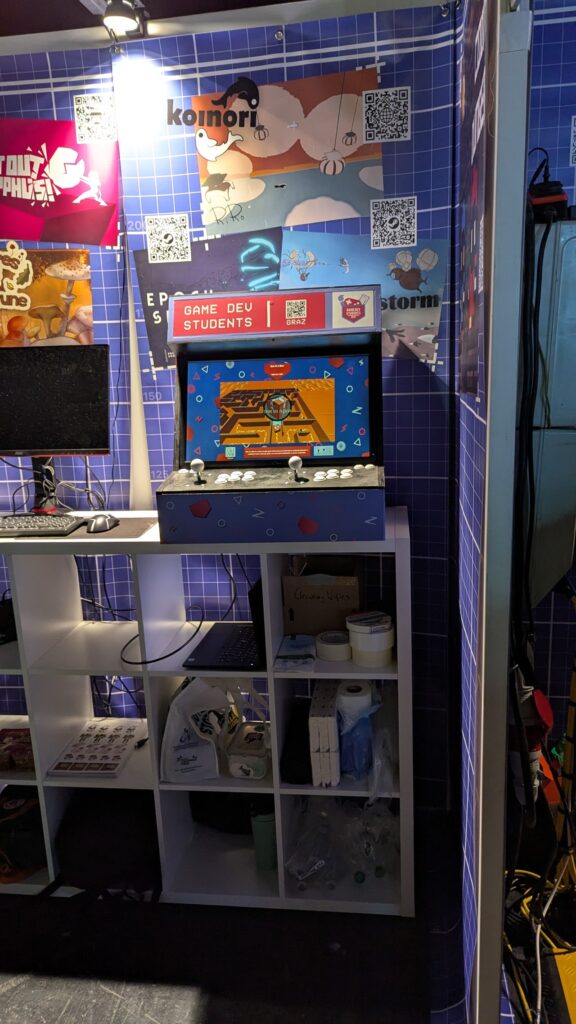
[G-06] Arcade Machine Version (optional)
We also offer an additional way to show off your games! In cooperation with the Game Dev Students Graz, we provide the opportunity to port your games onto their arcade machine. Such a port comes with limitations, the biggest being the available control scheme. The arcade machine is equipped with one joystick, six main buttons, and two menu buttons (start and exit), with all of these elements duplicated to support two-player games.
Please keep in mind that this is completely optional and does not affect grading in any way (nor does it award any points). This is just an opportunity we want to provide you to enrich your portfolio and also gain some reach for your projects!
If you are interested, contact your tutoring team for further information.
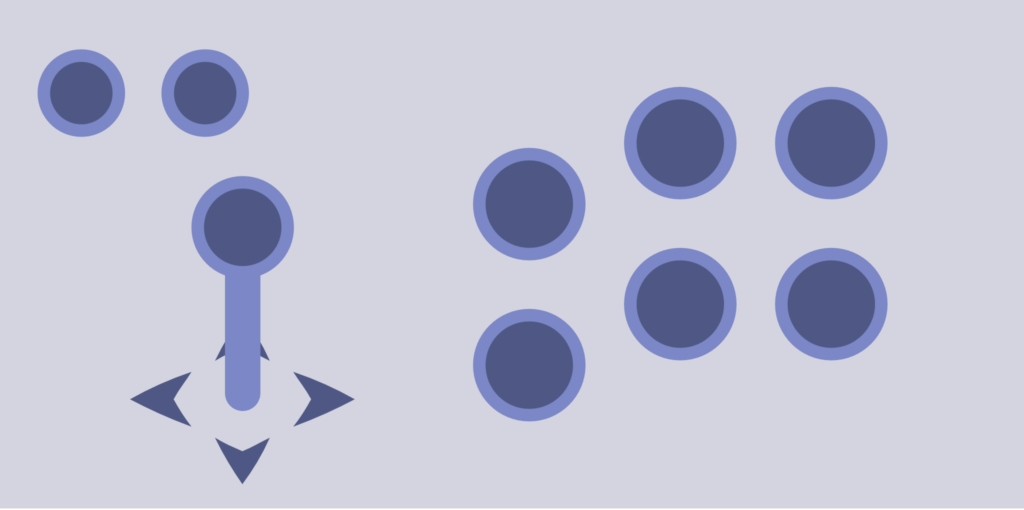
This layout exists twice, for two-player compatibility.
Second Chance Assignment (Exclusive)
Overview
The second chance assignment can be used by everyone who received a negative grade on the individual assignment (achieved points < 50% of the total points). Upon completion of this assignment, the course may still be graded positively if enough points are earned.
The general task is to develop a classic 2D side-scrolling Shmup (“Shoot’em up”, think R-Type, Gradius, etc.) game in Unity. Every feature that needs to be implemented has already been selected and described in more detail below. You may want to check out this tutorial: https://pixelnest.io/tutorials/2d-game-unity/.
Make sure to use the Unity version stated here.
Note that at least 50% of points must be reached in order to receive a positive grade for the course.
Features Description
The following characteristics of a Shmup must be included:
- Side-Scrolling manner: The player character must move through the level from left to right.
- Boundaries: It should be possible for the player to move freely on the entire space (Arrow keys or WASD) and not be affected by gravity. Furthermore, it must not be possible to exceed the screen borders.
- Projectiles: The player must be able to shoot projectiles from their current location.
- Enemies: Enemies must enter the screen from the right-hand side. In some way, they must damage the player over time (either with projectiles or by collision). However, by firing projectiles at the enemies, they also take damage / get destroyed.
- Lose condition: Once the player reaches 0 hp, there must be some indication that the game is lost, e.g,. Game Over-Screen. Once the lose indication is shown, the player must be given the option to replay the game with no changes to the previous run (different amount of hp, different sprite, different lose/win condition, …).
- Win condition: The longer the player survives and/or the more enemies they kill, the higher their score will be. The score must be shown at all times during the run and must be part of a high-score-based system. During the session, the high score must be displayed and used to motivate the user; e.g., if a new run beats the high score, it should say something like “New high score: XXXX”. The high score system may reset when the entire application is restarted.
Additionally, the following features must be implemented. Note that those are not optional and must be included just like the features listed above:
- Ship selection: Add a simple player character selection screen with two choices before starting the game. The two selectable player characters should differ in visuals, movement speed, projectile damage, and health points.
- Special projectile: Add a special projectile the player can shoot, e.g., a homing projectile, which automatically targets the nearest player, … .
- Collectibles: Implement collectibles, such as coins, that the player can gather to improve their score. Collectibles must spawn over time, as the user progresses in the game.
- Main Menu: There must be a main menu before the actual game starts. This menu must contain the following information: your name, matriculation number, and how the controls in your game work. There should also be a button for starting the game, showing the credits, and quitting the game.
WebGL Build & itch.io Release
You must create an itch.io page to release your game (with the option to lock it behind a password). To do so, you must create a WebGL build. Do not underestimate the time required to create and test a WebGL build, as it may take considerably longer than expected. Make sure that the tutors can access the game at the end of the deadline, either directly via a link or via an additional password. The game must function the same on itch.io as in the Windows build (e.g., same UI scaling).
The itch.io link and any required access information must be submitted on TeachCenter together with the other submission files.
Assets and credits
The visual assets and sounds can be created by yourself however you like, or you can use freely available asset packs (if the license allows it and you credit the creator correctly). If you made assets yourself, give yourself some credit. Either way, as with the Pokémon game, credits are mandatory!
Report
In addition to the build and source code, you must also submit a report of the game. This report should cover all the features you implemented, including pictures for each one. Also, give a short description of the implementations. Only features mentioned and described in this report will be counted as completed. It is not necessary for this report to be done exceptionally well. However, it should be logically structured, well-organized, and easy to understand.
Submission
Upload a Windows build and source code to TeachCenter within the deadline in the schedule. They should be submitted in zip files called sc-shmup-build-########.zip and sc-shmup-source-########.zip. The report shall be named sc-shmup-report-########.pdf.
######## is your matriculation number, for example sc-shmup-build-12345678.zip, sc-shmup-source-12345678.zip and sc-shmup-report-12345678.pdf.
The source code ZIP should contain all files necessary to open and build the Unity project. Do not submit the entire Unity project folder, as this may result in an unnecessarily large ZIP file. Normally, the Assets/, Packages/ and ProjectSettings/ folders are sufficient, while Unity-generated folders such as Library/, Temp/ and Logs/ can be excluded. However, students are responsible for checking the requirements of their specific project and ensuring that the submitted files contain everything necessary to successfully open and build the Unity project.
The itch.io link and any required access information must also be submitted on TeachCenter within the deadline.
Links & More
Grading and Fine Print
Overview
Game Design and Development is a lecture with integrated exercises (VU, continual assessment). You will be deregistered from the lecture if you do not submit any assignments (partial course requirements, Teilleistungen). The examination is considered to have started when the assignment [I-01] GameDevDojo or any following assignment has been submitted.
You need to submit all assignments to receive a passing grade.
Each assignment will be graded based on how accurately you fulfill the tasks of the assignment description. For game assignments, the game design document, game elements, game design guidelines, usability, polishing, balancing, and presentation can also be considered. Readability, formatting, and how precisely the topic is addressed in written assignments can be additional decisive factors. For some assignments, you can earn bonus points; this is designated in the assignment description. The assignments are weighted according to the weighting table.
A total of 100% (excluding bonus points) can be achieved. Upon receiving 50% or more, the student receives a passing grade. The grading key denotes which percentage corresponds to which grade.
Note: Individual and group assignments must both be completed positively (>= 50%)!
Late submissions are not considered by default. Contact the tutors (before the deadline) if you cannot submit an assignment in time, we might be able to find a solution.
Partial course requirements are corrected after all partial course requirements have been completed.
If you decide not to finish the course after submitting the first assignment considered in the examination, contact the tutors so that the grouping can be updated. If there are any open questions, feel free to contact us.
Plagiarism
If unauthorized aids are used or cases of plagiarism occur (e.g. a written assignment contains parts copied from another source or referencing is not done properly, or a game contains 3rd-party assets without proper attribution) a grade of “U (Ungültig/Täuschung)”, meaning that the grade is invalid, is given for the course (§5 TU Graz Statute Part Plagiarism). The student is then requested to attend a hearing at which they are confronted with the incident.
Weighting
| I-01 | 5% |
| I-02 | 35% |
| Group Assignments | 60% |
Grading Key
| Percentage/Points | Grade | |
| >= 87.5 | 1 | |
| >= 75 | < 87.5 | 2 |
| >= 62.5 | < 75 | 3 |
| >= 50 | < 62.5 | 4 |
| < 50 | 5 |
Game Collection
A collection of games created in previous GameLabGraz lectures.
2025/26 GDD1 Games
2024/25 GDD1 Games
2022/23 GDD1 Games
2021/22 GDD1 Games
2020/21 GDD1 Games
2020 GDD2 Games
2019 GDD1 Games
2018 GDD2 Games
2017 GDD1 Games
Book Recommendations
Johanna’s personal book recommendations and books that the lecture draws inspiration from.
Jane McGonigal – Reality is Broken (+++)
One of my favorite books. Jane McGonigal offers inspiration and ideas for using games in different contexts. Reads like a novel and avoids theoretical aspects.
Jesse Schell – The Art of Game Design (+++)
This is the book I am using a lot for my lecture. Very good summary of the most important design aspects from different perspectives (technical, player psychology, and other design considerations).
Scott Rogers – Level Up (2nd Edition) (+++)
Also, an excellent book on game design. I’ve especially enjoyed the bonus chapters with inspirational lists for environments, game mechanics, and different templates as an inspirational resource for your games.
Jeremy Gibson – Introduction to Game Design, Prototyping, and Development (++)
This book also gives a very nice introduction to game design techniques, but in a more practical manner. The main part of this book is a unity and C# tutorial.
Raph Koster – A Theory of Fun (++)
I simply love the style of this book. It has comics and sketches?
Flow – Mihaly Csikszentmihalyi (+)
Wonderful book (THE book) about the flow experience, with neat examples from all kinds of fields.
Katie Salen & Eric Zimmerman – Rules of Play (+)
Very interesting book on game design, with many practical examples.
Attributions
[I-00] Photo by Tim Mossholder on Unsplash
[I-01] Photo by Aidan Granberry on Unsplash
[I-02] Drawing by former Tutor Emma Stettner